PeopleCert: Redeem & schedule your exam and access eBook
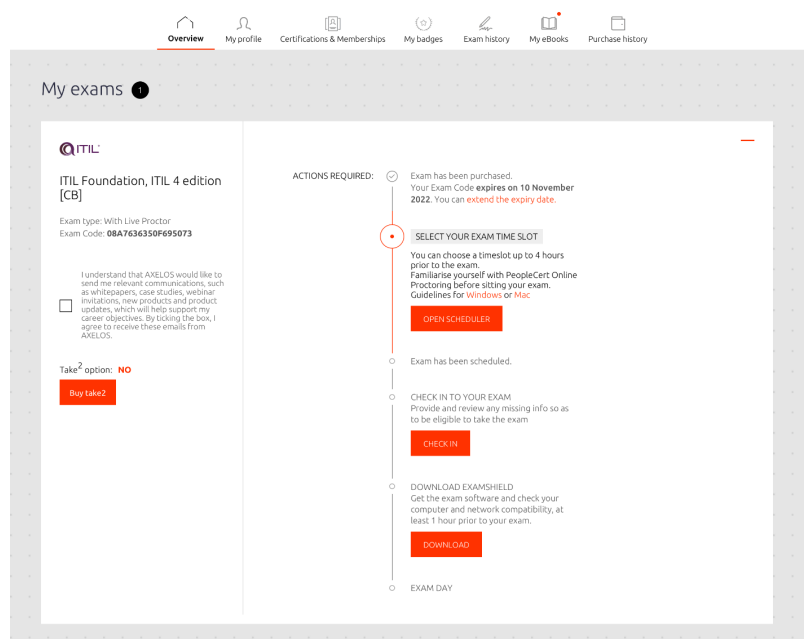
To redeem your Exam Code, please read the Candidate Guidelines and follow the steps below:
1: Visit https://www.peoplecert.org/
2: Create your PeopleCert Account. If you already have one, please sign in.
3: Enter the Exam Code provided to you by your Training Organisation.
4: Follow the on-screen instructions, submit the required information, and schedule your exams. Regards,

PeopleCert NOTE: You must use your Exam Code(s) to schedule and take the exam by the end of the Valid to Date, at 23:59:59 (Time Zone UTC +2) Exam Code extension and exam rescheduling are subject to administrative charges. Free rescheduling until 48 hours before your scheduled exam time as per PeopleCert's Terms of Service.
Accessing E-book instructions
We would like to inform you, that to activate and access your e-book, you will need login to your PeopleCert profile and:
Enter the voucher code you have received from your Training centre in the PeopleCert Code box.
A confirmation screen will come up verifying the action and you will be able to select the eBook language you are about to acquire, if the centre has not already pre-selected it during voucher order.
You will be able to access your eBook through the My eBooks tab and schedule the exam by navigating to the Overview tab.